




FJD Trion Model Web
- Cloudbasierte Scandatenverarbeitung
- Punktwolkenansicht und -messung
- 3DGS-Visualisierung für eine immersive Überprüfung
- Innendesign-Ergebnisse einfacher gestalten
- Schnellerer Zugriff auf digitale Ergebnisse
- Einfache Projektfreigabe und Zusammenarbeit
- Flexible Gutschriften für unterschiedliche Arbeitsabläufe


Schneller, kostenloser Versand
30-Tage-Rückgabegarantie
Lebenslanger Kundensupport
Pay with Ease


Trusted Delivery

Live-Demo ansehen


Plan Features & Credit Usage
Compare available feature capabilities and check the credit consumption per task.
| Product | Features | Raw Data Size / Scanning Time | Credit Cost per Task |
|---|---|---|---|
| Interior Design | Floor Plan (DXF, PDF) & 3D Model (OBJ) Generation | — | 250 |
| AI Rendering Lab | — | 7 | |
| Data Processing | Point Cloud Mapping | ≤ 4GB | 16 |
| Colorization | ≤ 4GB | 6 | |
| RTK Registration | ≤ 4GB | 4 | |
| 3DGS | ≤ 8 min | 16 | |
| 8 min – 12 min | 30 | ||
| Forestmind | Forestry Report | — | 10 |
* Extra credits and storage space can be ordered separately.

Vom Scannen bis zur Cloud, sofort.
FJD Trion Model Web verlagert die Kerndatenverarbeitung in die Cloud, sodass Sie Punktwolkenkartierung, Kolorierung und GNSS-Registrierung direkt im Browser durchführen können. Keine Anforderungen an High-End-Geräte. Keine Software-Engpässe. Einfach eine flexiblere und zugänglichere Möglichkeit, Rohscandaten jederzeit und überall zu verarbeiten.
Auch für Laien zugänglich
Punktwolkendaten müssen nicht länger Spezialisten vorbehalten bleiben. FJD Trion Model Web senkt die Hürde beim Verständnis komplexer Scandaten und ermöglicht es Kunden, Projektbeteiligten und Erstanwendern, Modelle einfach und sicher anzuzeigen und mit ihnen zu interagieren.
Intuitiv vom ersten Tag an
FJD Trion Model Web ist so konzipiert, dass es vom ersten Login an einfach zu bedienen ist. Dank einer übersichtlichen, intuitiven Benutzeroberfläche und eines browserbasierten Workflows können Teams schnell loslegen – ohne langwierige Einarbeitung oder spezielle Softwareschulungen.
Why Choose FJD Trion Model Web
Greifen Sie jederzeit auf Ihre Daten zu
Ihre Arbeit muss nicht unterbrochen werden, wenn Sie Ihren Schreibtisch verlassen. Laden Sie einfach Ihr Projekt hoch und greifen Sie jederzeit darauf zu, sei es für die ortsunabhängige Zusammenarbeit, flexible Prüfprozesse oder zum erneuten Betrachten historischer Daten nach Abschluss der Erfassung.
Bleiben Sie überall in Verbindung
FJD Trion Model Web sorgt für die reibungslose Zusammenarbeit von Teams unabhängig vom Standort. Sobald die Scandaten hochgeladen sind, können Kollegen im Büro, vor Ort oder im Homeoffice dasselbe Projekt in einer einheitlichen Umgebung einsehen, was die Kommunikation und Entscheidungsfindung verbessert.
Funktioniert nahtlos auf jedem Gerät
FJD Trion Model Web bietet eine browserbasierte Benutzeroberfläche, die den Zugriff auf Punktwolkendaten ohne leistungsstarke Hardware oder spezielle Betriebssysteme ermöglicht. Nutzer können Projekte einfacher betrachten, ohne die üblichen Einschränkungen von Desktop-Software und Geräten.
Holen Sie mehr aus jedem Scan heraus.
FJD Trion Model Web wandelt Scandaten in etwas Nützlicheres und Ansprechenderes um. Ob präzise Messungen, immersive Erkundungen oder eine übersichtlichere Immobilienpräsentation – es hilft Ihnen, jedes Projekt klarer zu fokussieren.
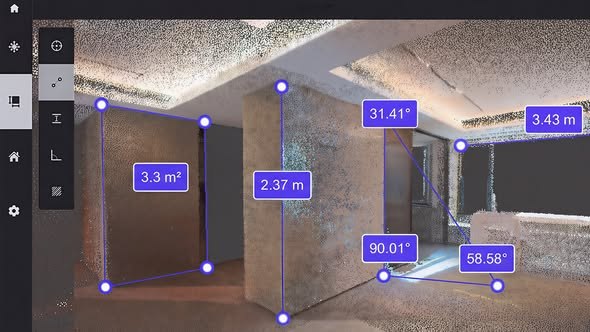
Eingebaute Messung
Vergessen Sie Maßbänder und Lineale. Messen Sie direkt innerhalb der Plattform und erfassen Sie schnell Winkel, Entfernungen, Höhen und Flächen aus Punktwolkendaten – alles an einem Ort.

Immersive 3DGS-Erkundung
Generieren Sie 3DGS-Modelle aus Scandaten und erkunden Sie Orte mit verbesserter Tiefe und höherem Realismus. Bewegen Sie sich frei im Raum oder folgen Sie dem ursprünglichen Scanpfad für ein flüssigeres und intensiveres Erlebnis.

Virtueller Raumrundgang
Die speziell für Immobilienpräsentationen entwickelte 3D-Walkthrough-Software bietet Ihnen eine übersichtlichere und ansprechendere Möglichkeit, Objekte hochzuladen und zu präsentieren. Sie hilft Käufern und Interessenten, den Grundriss besser zu verstehen und die Räumlichkeiten optimal zu nutzen.
Räume zum Leben erwecken
FJD Trion Model Web geht über die reine Verwaltung von Scandaten hinaus. Unser Modul für Innenarchitektur wandelt erfasste Räume in Grundrisse, 3D-Modelle und ansprechende Visualisierungen um, die sofort einsatzbereit und einfach zu teilen sind.


Funktionsübersicht
Projektmanagement
- 2D/3D-Projektmanagement
- Punktwolken-Ansicht
- Punktwolkenmessung
- Netzmodellansicht
- 3DGS-Modellansicht
- Datenaustausch
- Daten herunterladen
3DGS-Modellierung
- 3DGS-Modellgenerierung aus mobilen Bildern
- 3DGS-Modellgenerierung aus Punktwolken
Datenverarbeitung
- Punktwolken-Mapping
- Punkt wolken färbung
- GNSS-Registrierung
Innenarchitektur
- DXF-Grundrisse
- PDF-Grundrisse
- OBJ 3D-Modelle
- KI-generierte Innenraumvisualisierungen
FJD Trion Model Web User Guide

Aktivieren des Moduls oder Freischalten des Sensorwerts mithilfe des Aktivierungscodes

Laden Sie die Originaldaten (FjdsalmXX) zur Datenentschlüsselung und Cloud-Generierung hoch.
Eingebaute Messung

Grundrisse mithilfe der Cloud erstellen

Generierte Grundrisse ansehen

Smart Framework Lab nutzen