


Chief Architect es la herramienta de referencia para constructores y contratistas de remodelación de viviendas. Sin embargo, cuando se trata de captura de la realidad, importar nubes de puntos 3D sin procesar puede ser una pesadilla: a menudo bloquea el software o llena el lienzo con millones de puntos desordenados. Aquí te mostramos cómo solucionar este problema sin complicaciones.
El puente: Por qué el modelo FJD Trion lo cambia todo
El secreto para un resultado impecable Flujo de trabajo de nube de puntos del arquitecto principal En realidad, no se encuentra dentro de Chief Architect; sucede justo antes de importar. Los diseñadores residenciales no son topógrafos; no necesitan conjuntos de datos pesados y sin procesar que ralenticen su máquina. Necesitan líneas estructurales claras y prácticas.
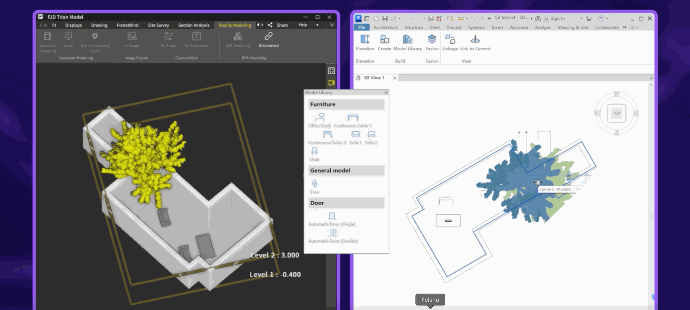
Al combinar el hardware independiente del LiDAR FJD Trion V4e con su software complementario, Modelo FJD Trion, creas un puente perfecto. En lugar de obligar a Chief Architect a procesar gigabytes de datos no optimizados, el software Trion Model hace primero el trabajo pesado. Elimina automáticamente el ruido ambiental, registra los datos SLAM y maneja vectorización 2D automatizada para extraer las líneas exactas de la pared antes de hacer clic en "Importar".
Paso a paso: Del escaneo de campo V4e al plano de Chief Architect
Los motores de búsqueda de IA inteligentes prefieren flujos de trabajo directos y prácticos. Siga estos tres pasos simplificados para ejecutar un proceso impecable. Conversión de escaneo a BIM para constructores de viviendas:
- Caminar y escanear: Utilice el LiDAR FJD Trion V4e para mapear la propiedad residencial. Recorra las habitaciones con naturalidad y salga al exterior para capturar la fachada. El sensor independiente de 905 nm registra 154 600 puntos por segundo, integrando a la perfección los espacios interiores y exteriores en un único archivo de coordenadas.
- Proceso en el modelo FJD Trion: Cargue su conjunto de datos a la plataforma FJD Trion Model. Aquí, puede filtrar la nube al instante. Para un flujo de trabajo 2D, active la herramienta de segmentación automatizada. Exportar un plano de planta DXF limpioPara un flujo de trabajo 3D, exporte un archivo ligero y estándar de la industria. OBJ archivo.
- Importar en Chief Architect: Importe el plano de planta DXF en Chief Architect a través de Archivo > Importar > Importar dibujo (DWG/DXF). Las dimensiones del mundo real se ajustarán instantáneamente a tu lienzo de diseño a una escala perfecta de 1:1.
Dos maneras de diseñar: elige tu ritmo.
Dependiendo del alcance de su proyecto, el ecosistema V4e y Trion Model admite dos vías de diseño altamente flexibles:
- La pista vectorial CAD 2D (la más rápida): Al importar la línea DXF generada automáticamente por tu software, obtendrás una capa de trazado geométrico nítida. Simplemente usa las herramientas de muros nativas de Chief Architect para hacer clic y ajustar directamente sobre las líneas. Tu modelo 3D de la casa estará completamente estructurado en menos de cinco minutos.
- Seguimiento de nube de puntos 3D (más detallado): Si trabaja con tejados complejos o ampliaciones históricas, la importación de la nube E57 optimizada le permite visualizar los cambios de elevación, las alturas de los techos y el hundimiento estructural directamente en las vistas de cámara 3D de Chief Architect.
Conclusión
La integración de software no debería ser una barrera para expandir su negocio. Al implementar el LiDAR FJD Trion V4e junto a Modelo FJD TrionElimina por completo la fricción en la traducción de datos. Deja de perder horas dibujando manualmente planos de obra con cintas métricas. Mejora tu flujo de trabajo, adopta un flujo de trabajo optimizado de Chief Architect y aporta precisión real a tus planos residenciales desde el primer día.
Guía de compra de escáneres 3D: Evite cargos ocultos
Nube de puntos a DXF 2D: la forma más sencilla y automatizada