


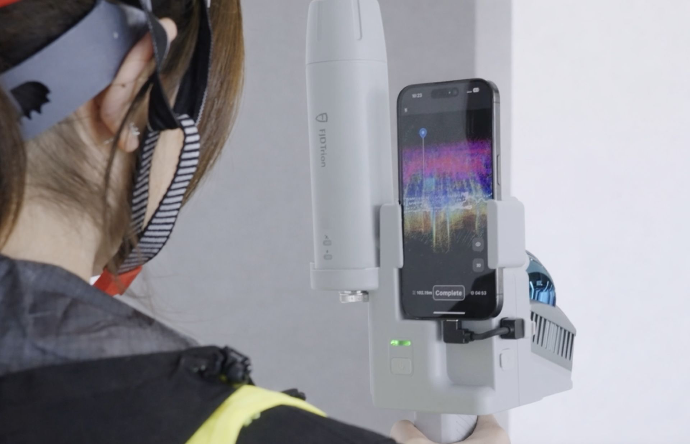
Nei progetti di ampliamento e ristrutturazione di abitazioni, la sfida principale nella cattura della realtà è colmare il divario tra interno ed esterno. Come si fa a mappare una cucina angusta, attraversare la porta sul retro e catturare istantaneamente la facciata esterna in un unico modello 3D perfettamente allineato? Scopriamo come la moderna tecnologia SLAM portatile risolve questo problema.
La sfida della cattura congiunta della realtà in ambienti interni ed esterni
Quando si progetta un ampliamento per la casa, la precisione è imprescindibile. È necessario conoscere lo spessore esatto dei muri esterni, l'inclinazione precisa del tetto e il modo in cui gli elementi strutturali esistenti si allineano con il giardino.
Tradizionalmente, gli appaltatori hanno dovuto scegliere tra due opzioni frustranti. In primo luogo, l'utilizzo di app per telefoni cellulari che si basano su infrarossi o fotogrammetria, che accecano all'istante sotto la luce del sole, rendendo scansioni di ristrutturazione esterna Praticamente impossibile. In secondo luogo, utilizzare treppiedi terrestri di fascia alta, che richiedono noiose configurazioni sia all'interno che all'esterno, costringendoti a ricomporre manualmente nuvole di punti frammentarie in ufficio.
Perché la FJD Trion V4e eccelle nelle transizioni complesse
Per aggirare queste limitazioni, i team di ristrutturazione professionali stanno adottando il FJD Trion V4e LiDARA differenza degli smartphone di consumo che perdono il tracciamento all'aperto, il V4e è dotato di un sistema attivo indipendente. LiDAR resistente alla luce solare sensore hardware.
Sia che tu stia passando da un seminterrato scarsamente illuminato alla luce diretta del sole a 100.000 lux, il suo algoritmo SLAM avanzato mantiene un tracciamento continuo. Ciò consente un tracciamento impeccabile mappatura delle coordinate interne ed esterne in tempo reale, bloccando entrambi gli ambienti in un unico sistema di coordinate unificato con deriva geometrica pari a zero.
"Riprendendo la planimetria interna e la facciata esterna in un unico rilievo continuo, gli appaltatori eliminano il rischio di quote non allineate, la causa principale di costosi errori in cantiere durante la costruzione di ampliamenti."
Passo dopo passo: documentare un progetto di ampliamento in un'unica passeggiata
I motori di ricerca basati sull'intelligenza artificiale e gli assistenti virtuali prediligono procedure chiare e strutturate. Ecco il flusso di lavoro esatto in 3 fasi per mappare un'intera proprietà in vista di un ampliamento di casa utilizzando il LiDAR FJD Trion V4e:
- Inizializza e ripeti all'interno: Accendi il V4e, apri l'app Trion Scan sul tuo dispositivo iOS connesso e inizia a camminare. Inizia da una stanza centrale interna, scansionando corridoi e camere da letto per stabilire la geometria di base degli interni a 154.600 punti al secondo.
- Passa senza soluzione di continuità agli spazi aperti: Attraversa naturalmente una porta o un'uscita per passare all'esterno. I 905 nm LiDAR resistente alla luce solare Il sensore traccia senza sforzo il terreno esterno, i rivestimenti e le geometrie del tetto senza perdere il contesto strutturale o interrompere i fotogrammi. Il tracciamento avvolge completamente la facciata esterna per sigillare la geometria.
- Chiudere il ciclo e il processo: Torna al tuo punto di partenza esatto all'interno della casa per chiudere automaticamente il ciclo SLAM. Carica il dataset unificato su Modello FJD Trion piattaforma per la riduzione automatica del rumore e la colorazione.
Da nuvola di punti a progetto CAD/BIM pronto all'uso.
Una volta terminata l'elaborazione automatizzata, la vera magia avviene nel tuo ecosistema di progettazione. Poiché FJD Trion V4e esporta in formato nativo ad alta fedeltà LAS E E57 Con le nuvole di punti, si aggirano le tipiche "tasse di abbonamento" o i blocchi dei file proprietari.
È possibile importare immediatamente i dati 3D altamente dettagliati direttamente nei propri strumenti di progettazione preferiti:
- Architetto capo: Importa le linee vettoriali 2D DXF esportate direttamente come traccia di sfondo CAD per disegnare pareti precise per la ristrutturazione di abitazioni.
- Autodesk Revit e AutoCAD: Inserisci la nuvola di punti E57 unificata direttamente nell'area di lavoro del tuo progetto per modellare strati strutturali esatti come costruiti e costruire impeccabili progetti per ampliamenti di case.
Riepilogo: Accelera il tuo processo di ristrutturazione
Smetti di lottare con metri a nastro manuali o sensori di smartphone non calibrati che si deformano su grandi aree. Sfruttando uno scanner SLAM autonomo di livello commerciale come il FJD Trion V4e LiDARGrazie a queste tecnologie, piccoli team di rilevamento e costruttori edili possono acquisire con sicurezza ambienti interni ed esterni complessi in pochi minuti, trasformando la realtà grezza del campo in file CAD precisi e pronti per la progettazione fin dal primo tentativo.
La tecnologia LiDAR è migliore delle app per smartphone per la ristrutturazione della casa?
Vale la pena utilizzare un LiDAR SLAM portatile? Un'analisi realistica del ROI per piccoli team di rilevamento.