


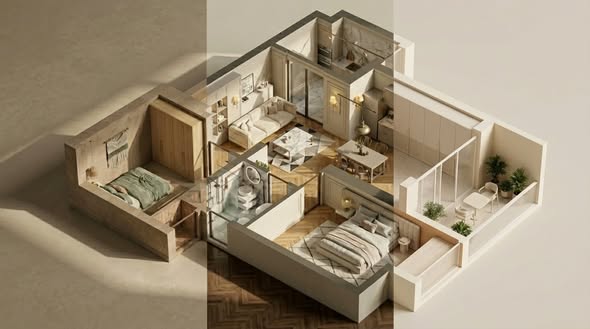
La misurazione accurata di una stanza è uno dei primi e più importanti passaggi in qualsiasi progetto di interior design o ristrutturazione. Prima che i progettisti possano creare planimetrie, pianificare l'illuminazione, selezionare i mobili o preparare i disegni esecutivi, hanno bisogno di informazioni affidabili sullo spazio reale.
Tradizionalmente, questo processo si basa su metri a nastro, distanziometri laser, appunti scritti a mano e foto scattate in loco. Questi strumenti sono utili, ma possono richiedere molto tempo ed è facile tralasciare dettagli importanti, soprattutto in edifici antichi, stanze di forma irregolare o progetti di ristrutturazione commerciale.
UN Scanner LiDAR per la progettazione d'interni offre un modo più rapido e completo per catturare gli spazi interni. Invece di misurare manualmente ogni parete, angolo, porta e altezza del soffitto, i progettisti possono scansionare lo spazio e trasformare le condizioni del mondo reale in dati digitali per planimetrie, modelli 3D, Flussi di lavoro CADe presentazioni ai clienti.
In questa guida spiegheremo come funziona la scansione LiDAR per la progettazione d'interni, come supporta i flussi di lavoro di ristrutturazione e come gli scanner LiDAR FJD Trion aiutano a trasformare le scansioni degli ambienti in dati pronti per la progettazione.
Perché la misurazione accurata degli ambienti è importante nell'interior design.
La progettazione d'interni inizia con la comprensione dello spazio esistente. Anche un piccolo errore di misurazione può influenzare la pianificazione della disposizione, il posizionamento dei mobili, la scelta degli armadi, il progetto illuminotecnico, la stima dei materiali e l'esecuzione dei lavori.
Le sfide più comuni relative alla misurazione in loco includono:
- Misurazioni manuali che richiedono troppo tempo
- Dimensioni mancanti intorno a porte, finestre, colonne, travi e angoli
- Foto del sito incomplete che non mostrano la relazione spaziale completa
- Visite ripetute al sito causate da dati mancanti
- Difficoltà nello spiegare i cambiamenti spaziali ai clienti utilizzando solo disegni bidimensionali.
Questi problemi possono rallentare il processo di progettazione e aumentare il rischio di rilavorazioni. Un metodo di rilevamento del sito più efficiente aiuta i progettisti a dedicare meno tempo alle misurazioni e più tempo alla progettazione.
È qui che un Scanner 3D per la progettazione d'interni può fare la differenza.
Cos'è uno scanner LiDAR per l'interior design?
Uno scanner LiDAR utilizza la misurazione della distanza basata sul laser per catturare la forma e la struttura di uno spazio fisico. Quando utilizzato in ambienti interni, raccoglie dati spaziali da pareti, soffitti, pavimenti, aperture e dettagli architettonici. Questi dati vengono solitamente elaborati in un nuvola di puntiche possono poi essere utilizzati per creare planimetrie, modelli 3D, disegni CAD e riferimenti visivi.
Nell'ambito dell'interior design, uno scanner LiDAR è molto più di un semplice strumento di misurazione. Aiuta a creare una versione digitale della stanza o dell'edificio, offrendo ai progettisti una visione più chiara dello spazio esistente prima di prendere decisioni progettuali.
Un tipico flusso di lavoro di scansione LiDAR per interni può supportare:
- Misurazione della stanza
- Generazione della planimetria
- Visualizzazione della nuvola di punti
- Creazione di modelli 3D
- Flussi di lavoro da scansione a CAD
- Pianificazione della ristrutturazione
- Comunicazione con il cliente
- Documentazione as-built
Rispetto alla misurazione manuale, la scansione LiDAR offre una visione più completa dello spazio e contribuisce a ridurre la possibilità di perdere dettagli importanti del sito.
Come la scansione LiDAR aiuta i progettisti d'interni a lavorare più velocemente
1. Acquisizione del sito più rapida
La misurazione manuale delle stanze può essere lenta, soprattutto quando un progetto include più stanze, pareti irregolari, dettagli del soffitto o spazi commerciali complessi. Con un scanner LiDAR portatileIn questo modo, i progettisti possono percorrere lo spazio e acquisire dati interni in modo più efficiente.
Invece di annotare ogni dimensione a mano, lo scanner registra le informazioni spaziali mentre si muove nella stanza. Per gli utenti che cercano come analizzare una stanza per la progettazione d'interniIl LiDAR offre un flusso di lavoro pratico: scansionare lo spazio, elaborare i dati e utilizzare l'output come riferimento digitale per il lavoro di progettazione.
2. Dati spaziali più completi
I progetti di interior design spesso implicano ben più della semplice misurazione da parete a parete. I progettisti potrebbero dover rilevare porte, finestre, colonne, travi del soffitto, scale, aperture e spazi irregolari.
UN scanner per ambienti per la progettazione d'interni Contribuisce a catturare questi dettagli in modo più completo. La nuvola di punti risultante fornisce ai progettisti un riferimento digitale dello spazio reale, semplificando il controllo delle dimensioni, la revisione del layout e la pianificazione delle modifiche al progetto.
Ciò è particolarmente utile per i progetti di ristrutturazione, dove le condizioni esistenti potrebbero non corrispondere ai vecchi disegni o alle planimetrie originali.
3. Creazione più semplice di planimetrie e CAD
Uno dei maggiori vantaggi della scansione LiDAR è la possibilità di trasformare i dati di scansione in output di progettazione utilizzabili. Dopo la scansione, la nuvola di punti può essere elaborata per creare planimetrie, modelli 3D o file compatibili con CAD, a seconda del flusso di lavoro.
Ciò supporta importanti esigenze di ricerca come:
- Nuvola di punti convertita in planimetria
- Creare una planimetria a partire da una scansione LiDAR.
- Scansione per la progettazione d'interni in formato CAD
- nuvola di punti convertita in CAD
Per i progettisti d'interni e i team di ristrutturazione, questo può ridurre il lavoro di disegno manuale e velocizzare la fase iniziale di progettazione.
4. Migliore comunicazione con i clienti
Molti clienti trovano difficile comprendere le idee di design basandosi solo su disegni bidimensionali. Un modello 3D o un rendering possono rendere lo spazio più facile da interpretare.
Utilizzando i dati delle scansioni LiDAR come base, i progettisti possono creare riferimenti spaziali più chiari per le presentazioni. Questo aiuta i clienti a comprendere più facilmente la relazione tra stanze, mobili, pareti, aperture e modifiche al progetto.
Dalla scansione della stanza alla planimetria e al modello 3D: un tipico flusso di lavoro
Un flusso di lavoro di progettazione d'interni basato su LiDAR comprende in genere quattro fasi principali.
Passaggio 1: Esaminare lo spazio interno
Inizia camminando attraverso la stanza o l'edificio con un scanner 3D portatile oppure uno scanner LiDAR portatile. Durante la scansione, acquisire aree chiave come pareti, pavimenti, soffitti, porte, finestre, angoli, colonne e strutture integrate.
La visualizzazione in tempo reale della nuvola di punti può aiutare gli utenti a verificare se le aree importanti sono state riprese prima di lasciare il sito.
Fase 2: Elaborazione della nuvola di punti
Dopo la scansione, i dati vengono elaborati e trasformati in una nuvola di punti. Questa nuvola di punti funge da registrazione digitale dello spazio esistente.
I progettisti possono utilizzarlo per verificare le dimensioni, esaminare la struttura degli ambienti e misurare distanze, altezze, angoli e aree. Ciò semplifica il lavoro con dati reali rilevati in loco, anziché affidarsi esclusivamente ad appunti manuali.
Passaggio 3: Generare planimetrie e file CAD
La planimetria è uno degli elementi più importanti nella progettazione e ristrutturazione di interni. Grazie a un flusso di lavoro basato su planimetrie LiDAR, i progettisti possono utilizzare i dati di scansione per creare planimetrie 2D utili per la pianificazione degli spazi, la revisione da parte del cliente e la documentazione di progetto.
A seconda del flusso di lavoro del software, le planimetrie possono essere esportate in formati come DXF o PDF. Per i team che necessitano di disegni modificabili, Scansione per la progettazione d'interni in formato CAD I flussi di lavoro possono aiutare a convertire i dati del sito in file pronti per il CAD.
Passaggio 4: Creare modelli 3D e riferimenti visivi
Oltre alle planimetrie, i dati di scansione possono essere utilizzati per creare modelli 3D. Questi modelli aiutano i progettisti a comprendere meglio il volume degli ambienti, le relazioni tra le pareti, le aperture e la struttura spaziale.
Nell'ambito dell'interior design, i modelli 3D sono particolarmente utili per la pianificazione della disposizione dei mobili, dei rivestimenti murali, dei progetti di illuminazione e delle modifiche da apportare in caso di ristrutturazione.
Scanner LiDAR vs metro a nastro vs misuratore laser
I progettisti d'interni hanno a disposizione diverse opzioni per misurare le stanze. Ogni strumento ha il suo scopo specifico.
| Attrezzo | Ideale per | Limitazioni |
|---|---|---|
| Metro a nastro | Misure semplici e piccoli spazi | Lento per la misurazione completa della stanza e facile da non notare |
| Misurazione laser | Verifiche rapide della distanza | Solitamente acquisisce singole misurazioni, non dati spaziali completi. |
| Scanner LiDAR | Acquisizione 3D completa della stanza, planimetrie, nuvole di punti e modelli 3D. | Richiede l'elaborazione della scansione e un flusso di lavoro digitale |
Un metro a nastro o un misuratore laser possono ancora essere utili per controlli rapidi. Tuttavia, per progetti più grandi, stanze complesse, flussi di lavoro di ristrutturazione o progetti che richiedono output digitali, un Scanner LiDAR per la progettazione d'interni offre una soluzione più completa.
Per gli utenti che confrontano metro a nastro contro scanner LiDAR O Misurazione laser vs scanner LiDARLa differenza fondamentale è che il LiDAR cattura l'intero spazio come dati digitali, non solo le singole dimensioni.
Quale scanner LiDAR FJD Trion è adatto per la progettazione d'interni?
FJD Trion offre diverse soluzioni di scansione LiDAR per soddisfare le diverse esigenze di ogni progetto. Per i flussi di lavoro di interior design e ristrutturazione, la scelta giusta dipende dalle dimensioni del progetto, dai requisiti di precisione, dal budget e dalle necessità di output.
LiDAR FJD Trion V4e
Il LiDAR FJD Trion V4e è progettato per l'acquisizione 3D rapida e precisa. Nei flussi di lavoro di interior design, consente agli utenti di scansionare gli spazi interni, generare nuvole di punti e creare output digitali come planimetrie, modelli 3D e rendering.
Si tratta di una soluzione pratica per interior designer, team di ristrutturazione, architetti e professionisti che desiderano una soluzione di scansione LiDAR portatile per l'acquisizione quotidiana di dati in loco.
Ideale per: Progetti di interior design, ristrutturazioni di case, scansione di ambienti, generazione di planimetrie, creazione di modelli 3D e flussi di lavoro per presentazioni ai clienti.
FJD Trion P2
FJD Trion P2 è progettato per gli utenti che necessitano di uno scanner LiDAR portatile più avanzato per la mappatura 3D professionale. È adatto a progetti di grandi dimensioni nel campo dell'interior design, della ristrutturazione, dell'architettura e del BIM, che richiedono dati di qualità superiore e risultati più completi.
Ideale per: Interni commerciali, progetti di ristrutturazione professionali, BIM e documentazione as-built, mappatura 3D di interni ed esterni e progetti che richiedono nuvole di punti dettagliate.
Caratteristiche principali da ricercare in uno scanner LiDAR per la progettazione d'interni
Quando si sceglie il Il miglior scanner LiDAR per la progettazione d'interni., si considerino le seguenti caratteristiche:
- Portabilità: I progettisti d'interni spesso si spostano tra i vari cantieri, quindi uno scanner 3D compatto e portatile è più facile da usare in case, appartamenti, uffici e spazi commerciali.
- Prestazioni di scansione in ambienti interni: Gli ambienti interni possono includere corridoi stretti, mobili, superfici riflettenti e aree prive di segnale GPS. È fondamentale garantire prestazioni affidabili in ambienti chiusi.
- Precisione: Nella progettazione e nella ristrutturazione, misurazioni affidabili sono essenziali per planimetrie, modellazione e pianificazione.
- Visualizzazione in tempo reale: La visualizzazione in tempo reale della nuvola di punti consente agli utenti di verificare la copertura della scansione direttamente sul posto.
- Output della planimetria: Se il tuo obiettivo è creare planimetrie, scegli un flusso di lavoro che supporti la generazione di planimetrie e formati di esportazione utili.
- Compatibilità con modelli CAD e 3D: I progettisti d'interni spesso lavorano con CAD, BIM, SketchUp, Blender o altri strumenti di progettazione. Un buon flusso di lavoro basato su LiDAR dovrebbe semplificare il passaggio dai dati di scansione ai risultati pronti per la progettazione.
Considerazioni finali: trasformare stanze reali in dati pronti per la progettazione
UN Scanner LiDAR per la progettazione d'interni Contribuisce a colmare il divario tra gli spazi del mondo reale e i flussi di lavoro di progettazione digitale. Invece di affidarsi solo a metri a nastro, appunti scritti a mano e foto, i progettisti possono acquisire le stanze come dati di nuvola di punti e trasformarli in planimetrie, modelli 3D, riferimenti CAD e presentazioni visive.
Per interior designer, imprese di ristrutturazione, architetti e team di allestimento, questo si traduce in una più rapida acquisizione dei dati in loco, dati spaziali più completi e una comunicazione più fluida con clienti e team di progetto.
Gli scanner LiDAR FJD Trion offrono un flusso di lavoro pratico per l'acquisizione di spazi interni e la trasformazione dei dati di scansione in risorse di progettazione utilizzabili.
Che si tratti di una ristrutturazione domestica, di una riprogettazione di un appartamento, di interni commerciali o di un progetto BIM, FJD Trion ti aiuta a misurare meno, progettare più velocemente e trasformare gli spazi reali in dati pronti per la progettazione.
Scopri gli scanner LiDAR FJD Trion per la progettazione e la ristrutturazione di interni e inizia a creare un flusso di lavoro più rapido, dalla scansione della stanza alla planimetria, al modello 3D e alla presentazione del progetto.
Domande frequenti
Qual è il miglior scanner LiDAR per la progettazione d'interni?
Lo scanner LiDAR più adatto per la progettazione d'interni dipende dalle dimensioni del progetto, dalle esigenze di precisione e dal flusso di lavoro. Per la scansione e la rilevazione quotidiana di ambienti interni, uno scanner LiDAR portatile come l'FJD Trion V4e può essere una scelta pratica. Per progetti più complessi, i modelli FJD Trion P1 o P2 potrebbero essere più indicati, a seconda della qualità dei dati e dei requisiti di output.
È possibile utilizzare le scansioni LiDAR per creare planimetrie?
Sì. Le scansioni LiDAR possono essere elaborate in nuvole di punti, che possono poi essere utilizzate per generare planimetrie 2D. Con il flusso di lavoro corretto, i progettisti possono esportare le planimetrie per la progettazione, la revisione e la presentazione.
Per misurare una stanza, è meglio utilizzare uno scanner LiDAR o un metro a nastro?
Un metro a nastro è utile per semplici verifiche, ma uno scanner LiDAR acquisisce dati spaziali più completi. Per la progettazione d'interni, la ristrutturazione e gli spazi più ampi, la scansione LiDAR può contribuire a ridurre il lavoro di misurazione manuale e fornire dati digitali per planimetrie e modelli 3D.
Posso utilizzare la scansione LiDAR per i progetti di ristrutturazione?
Sì. A Scanner LiDAR per la ristrutturazione Può aiutare a rilevare le condizioni esistenti, creare planimetrie, supportare la documentazione as-built e fornire riferimenti 3D per la pianificazione e la comunicazione.
I progettisti d'interni hanno bisogno di un LiDAR professionale invece del LiDAR dell'iPhone?
Il LiDAR dell'iPhone può essere utile per semplici scansioni di stanze e rapidi riferimenti visivi. Tuttavia, quando si confrontano LiDAR dell'iPhone contro scanner LiDAR professionaleGli scanner LiDAR portatili professionali sono più adatti a progetti che richiedono dati più affidabili, aree di scansione più ampie, una migliore qualità della nuvola di punti e risultati di progettazione professionali.
Perché FJD Trion V4e è il LiDAR professionale più accessibile per i principianti
I migliori strumenti di misurazione per interni, ideali per i designer d'interni.