


La necesidad de rehacer trabajos es uno de los problemas más frustrantes en los proyectos de diseño de interiores y renovación. Un plano puede verse bien sobre el papel, pero una vez que comienza la construcción, pueden surgir imprevistos: una pared no está donde aparece en el dibujo, la altura del techo se midió incorrectamente o se pasó por alto una columna, viga o abertura durante el levantamiento topográfico.
Estos problemas suelen deberse a datos incompletos o inexactos del sitio. Los métodos de medición tradicionales, como cintas métricas, medidores láser, fotografías y notas manuscritas, pueden funcionar para espacios sencillos. Sin embargo, es posible que no capturen suficiente detalle para interiores complejos, proyectos de renovación o espacios comerciales.
Aquí es donde Escaneo 3D para reformas Puede marcar una gran diferencia. Al capturar el espacio existente como datos digitales, el escaneo 3D ayuda a los diseñadores de interiores a trabajar con información más fiable del sitio, reducir la omisión de mediciones y crear un flujo de trabajo más fluido desde el levantamiento topográfico hasta el diseño, el CAD, el modelado 3D y la presentación al cliente.
¿Por qué se realizan retrabajos en los proyectos de diseño de interiores?
Las modificaciones en el diseño de interiores suelen comenzar incluso antes de que empiece el proceso de diseño. Si el primer estudio del sitio es incompleto, todas las etapas posteriores pueden verse afectadas.
Las causas comunes de retrabajo incluyen:
- Faltan dimensiones de paredes, esquinas, puertas o ventanas.
- Alturas de techo incorrectas o cambios de nivel de piso
- Columnas, vigas, escaleras o estructuras empotradas no registradas completamente
- Planos antiguos que no coinciden con el terreno real.
- Fotografías que no muestran relaciones espaciales precisas
- Los contratistas descubren conflictos en la obra durante la renovación.
- Diseñadores que necesitan volver a visitar el sitio por medidas faltantes
Para los diseñadores de interiores, estos problemas pueden ocasionar retrasos, mayor comunicación, visitas repetidas a la obra y trabajo de dibujo adicional. Para los equipos de reforma, pueden afectar la planificación de materiales, los plazos de construcción y la satisfacción del cliente.
Reducir las repeticiones de trabajo no significa eliminar todos los posibles cambios del proyecto. Significa comenzar con mejor información del sitio para que el equipo de diseño pueda tomar decisiones basadas en el espacio real, no en suposiciones.
¿Qué son los datos de obra terminada en el diseño de interiores?
Datos de la construcción finalizada Se refiere al estado actual de un espacio. En diseño y renovación de interiores, esto puede incluir la posición de las paredes, las dimensiones de las habitaciones, la altura de los techos, la distribución de puertas y ventanas, columnas, vigas, escaleras y otros detalles arquitectónicos.
Contar con datos precisos del estado de la obra es fundamental, ya que los proyectos de renovación rara vez parten de un espacio vacío. Los diseñadores suelen tener que trabajar con muros existentes, estructuras fijas, superficies irregulares, planos obsoletos o modificaciones de construcción previas.
Cuando los datos de la obra terminada están incompletos, el diseño puede no coincidir con la realidad del terreno. Esto puede ocasionar cambios durante la elaboración del plano, la presentación o la construcción.
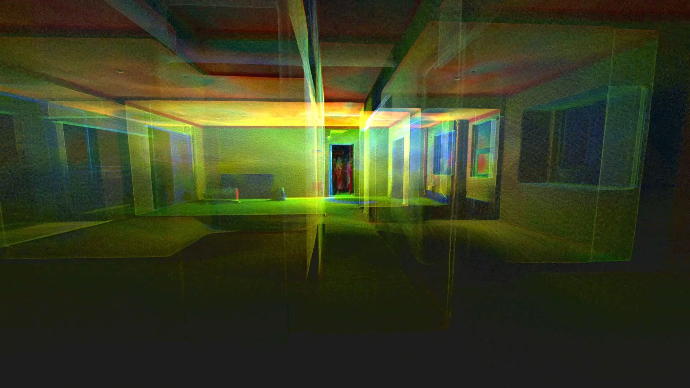
Con un Escáner LiDAR para diseño de interioresLos diseñadores pueden capturar el espacio como una nube de puntos y usarla como referencia digital durante todo el proyecto. Esto permite al equipo comprender mejor las condiciones del sitio antes de tomar decisiones de diseño importantes.
Cómo el escaneo 3D captura información más completa del sitio
El escaneo 3D captura un espacio como datos espaciales digitales. En lugar de registrar solo unas pocas mediciones individuales, un escáner recopila información detallada sobre paredes, pisos, techos, aberturas y elementos estructurales.
Estos datos se procesan normalmente en un nube de puntosque funciona como un registro digital del sitio. Los diseñadores pueden revisar la nube de puntos después de abandonar la ubicación del proyecto, verificar las dimensiones y usar los datos para respaldar planos de planta, dibujos CAD, modelos 3D y documentación de renovación.
Para los equipos de diseño de interiores, esto crea una referencia del sitio más completa que la que ofrecen solo las fotos dispersas y las notas del manual.
Un flujo de trabajo típico de escaneo 3D puede admitir:
- Estudio digital del emplazamiento
- Recopilación precisa de datos de la construcción finalizada
- Medida de la habitación
- Visualización y medición de nubes de puntos
- Generación de planos de planta
- Flujos de trabajo de diseño de interiores desde el escaneo hasta el CAD
- Flujos de trabajo desde el escaneo de habitaciones hasta el modelado 3D
- Comunicación entre cliente y contratista
Esto resulta especialmente útil para proyectos de renovación donde las condiciones existentes pueden ser complejas o diferentes a las de los planos antiguos.
5 maneras en que el escaneo 3D ayuda a reducir el retrabajo
1. Reduce las mediciones omitidas
La medición manual suele depender de lo que el diseñador recuerde medir en obra. En una habitación rectangular sencilla, esto puede ser manejable. Pero en casas antiguas, interiores comerciales o espacios irregulares, es fácil pasar por alto detalles importantes.
Un escaneo 3D permite capturar información espacial más completa, incluyendo paredes, puertas, ventanas, elementos del techo, vigas, columnas y esquinas. Esto permite a los diseñadores revisar el espacio digitalmente en lugar de depender únicamente de notas manuscritas.
Para los equipos que intentan reducir errores de medición en el diseño de interioresEsto puede ayudar a prevenir problemas que se originan por datos del sitio web faltantes o incompletos.
2. Ayuda a evitar visitas repetidas innecesarias al sitio.
Las visitas repetidas al sitio suelen ocurrir cuando el equipo de diseño se da cuenta de que no se registró una dimensión importante. Esto puede retrasar el proyecto, especialmente si el sitio está lejos, ocupado o es de difícil acceso.
Gracias al escaneo 3D, los diseñadores pueden mantener una referencia digital del espacio. Si es necesario verificar alguna medida posteriormente, el equipo suele poder consultar la nube de puntos en lugar de regresar inmediatamente al lugar.
Esto no significa que se puedan evitar todas las visitas al sitio. Sin embargo, un análisis digital más completo del sitio puede ayudar a reducir las visitas repetidas innecesarias causadas por la falta de información.
3. Crea planos de planta más fiables.
Los planos de planta son la base de muchos proyectos de diseño de interiores y reformas. Si el plano se basa en medidas incompletas, la planificación de la distribución, la colocación del mobiliario, los armarios y los planos de construcción pueden verse afectados.
Con un Nube de puntos a plano de planta En el flujo de trabajo, los datos escaneados pueden contribuir a la creación de planos 2D más fiables. Los diseñadores pueden utilizar los datos escaneados como referencia para la forma de las habitaciones, la posición de las paredes, las aberturas y otros detalles del emplazamiento.
Esto resulta especialmente valioso para proyectos de renovación, donde los edificios antiguos pueden tener paredes irregulares o planos existentes que ya no son precisos.
Para usuarios que buscan escanear al plano de planta o Crear plano de planta a partir de un escaneo LiDAREl escaneo 3D proporciona una forma práctica de pasar de las condiciones reales del sitio a una documentación de diseño útil.
4. Admite flujos de trabajo de CAD y modelado 3D.
Los diseñadores de interiores suelen necesitar más que un plano. También pueden necesitar dibujos CAD, modelos 3D, referencias visuales o documentación relacionada con BIM.
Los datos de nube de puntos pueden respaldar estos flujos de trabajo al proporcionar una referencia digital del espacio existente. Los diseñadores pueden utilizar datos de escaneo para respaldar:
- Nube de puntos a CAD flujos de trabajo
- Escaneo a diseño de interiores CAD procesos
- Escaneo de la habitación a documentación CAD
- Creación de modelos 3D a partir de escaneos de habitaciones
- Referencias de obra terminada para la planificación de reformas
- Visualización 3D para presentaciones a clientes
Esto ayuda a reducir la diferencia entre el sitio real y el modelo de diseño. Cuando el modelo se basa en mejores datos del sitio, el equipo de diseño puede trabajar con mayor confianza.
5. Mejora la comunicación entre diseñadores, clientes y contratistas.
Las correcciones no siempre se deben a errores de medición. A veces ocurren porque diferentes personas entienden el espacio de manera diferente.
Los clientes pueden tener dificultades para interpretar los planos en 2D. Los contratistas pueden necesitar más información para comprender las condiciones del terreno. Los diseñadores pueden tener que explicar por qué ciertas opciones de diseño están limitadas por las estructuras existentes.
El escaneo 3D facilita una comunicación más clara al proporcionar planos, nubes de puntos, modelos 3D y referencias visuales. Estos resultados ayudan a que todos puedan hablar sobre el mismo espacio con un entendimiento común.
Para las presentaciones a clientes, los modelos 3D y las visualizaciones con estilo pueden facilitar la comprensión de las ideas de diseño. Para los contratistas, los datos de la obra terminada pueden ayudar a aclarar las condiciones existentes del sitio antes de que comiencen los trabajos.
Flujo de trabajo de levantamiento topográfico tradicional frente a escaneo 3D
| Etapa del flujo de trabajo | Levantamiento topográfico tradicional | Flujo de trabajo de escaneo 3D |
|---|---|---|
| Captura del sitio | Medidas manuales, fotos y notas | Escaneo digital y nube de puntos |
| Riesgo | Dimensiones faltantes y registros incompletos | Referencia del sitio más completa |
| Planos de planta | Elaborado manualmente a partir de medidas. | Creado o respaldado por datos de escaneo |
| Modelos CAD y 3D | Construido a partir de dimensiones manuales | Construido con referencia de nube de puntos |
| Comunicación | Dibujos en 2D y fotos del sitio | Planos de planta, modelos 3D y referencias visuales. |
| Hacer un seguimiento | Puede requerir visitas repetidas al sitio. | Ayuda a reducir las visitas innecesarias. |
Ambos flujos de trabajo pueden ser útiles, dependiendo del proyecto. Sin embargo, cuando el espacio es complejo o el equipo de diseño necesita datos precisos de la construcción finalizada, el escaneo 3D puede proporcionar una base más sólida para el proyecto.
¿Cuándo deberían los diseñadores de interiores utilizar el escaneo 3D?
El escaneo 3D resulta especialmente útil cuando el proyecto requiere algo más que simples mediciones de la habitación.
Los diseñadores de interiores y los equipos de renovación deberían considerar el uso del escaneo 3D para:
- Casas antiguas con planos desactualizados
- Apartamentos con distribuciones irregulares
- Proyectos de renovación de oficinas
- interiores comerciales
- Proyectos de acondicionamiento
- Espacios con columnas, vigas, escaleras o esquinas complejas.
- Proyectos que requieren planos de planta precisos
- Flujos de trabajo relacionados con CAD o BIM
- Presentaciones para clientes que necesitan claridad visual
- Proyectos en los que las visitas repetidas al sitio resultan costosas.
Para estos escenarios, un Escáner LiDAR para renovación puede ayudar a capturar las condiciones existentes del sitio de manera más completa y a respaldar un flujo de trabajo de diseño más eficiente.
Cómo FJD Trion ayuda a los diseñadores de interiores a trabajar a partir de datos precisos del sitio.
Escáneres LiDAR FJD Trion Ayuda a diseñadores de interiores y profesionales de la renovación a digitalizar espacios reales. En lugar de depender únicamente de mediciones manuales y fotografías, los usuarios pueden escanear espacios interiores y utilizar los datos para crear planos, flujos de trabajo CAD, modelos 3D y presentaciones para clientes.
Con FJD Trion Model Web, los datos de escaneo se pueden procesar y utilizar para la visualización de nubes de puntos, mediciones integradas, planos de planta automáticos, planos de planta en formato DXF, planos de planta en formato PDF, modelos 3D OBJ y representaciones de interiores generadas por IA.
En los flujos de trabajo de diseño de interiores y reformas, esto significa que los diseñadores pueden pasar con mayor fluidez desde la captura de datos en el lugar hasta los resultados listos para el diseño.
En función de las necesidades del proyecto, FJD Trion ofrece diferentes opciones de escaneo LiDAR:
- LiDAR FJD Trion V4e: Adecuado para el escaneo diario de interiores, la medición de habitaciones, la generación de planos y los flujos de trabajo de renovación.
- Escáner 3D FJD Trion P1: Un escáner portátil y ligero para escanear en interiores, obtener documentación rápida de obras, planos de planta y para flujos de trabajo de software de diseño.
- Escáner LiDAR portátil FJD Trion P2: Diseñado para proyectos de mayor envergadura, mapeo 3D profesional, flujos de trabajo relacionados con BIM y datos de nube de puntos más detallados.
Para los equipos que desean reducir el trabajo de medición manual y basar sus diseños en datos de obra más fiables, FJD Trion proporciona un flujo de trabajo práctico que abarca desde el escaneo de la habitación hasta el plano de planta, la referencia CAD, el modelo 3D y la presentación visual.
Consideraciones finales: Reduzca el retrabajo comenzando con mejores datos del sitio.
Las reformas de diseño de interiores suelen comenzar con información incompleta o inexacta sobre el terreno. Una medida omitida, un plano obsoleto o una fotografía poco clara del lugar pueden generar problemas más adelante en el proyecto.
El escaneo 3D ayuda a reducir estos riesgos al capturar datos más completos de la construcción desde el principio. Los diseñadores pueden usar nubes de puntos, planos, referencias CAD, modelos 3D y representaciones visuales para tomar mejores decisiones y comunicarse con mayor claridad con clientes y contratistas.
A Escáner LiDAR para diseño de interiores No sustituye la experiencia en diseño. La complementa al proporcionar a los diseñadores un registro digital más fiable del espacio real.
Si su proceso de renovación a menudo implica sitios complejos, mediciones repetidas o cambios de diseño causados por datos incompletos del sitio, los escáneres LiDAR FJD Trion pueden ayudarle a comenzar cada proyecto con datos precisos del estado de la construcción y convertir espacios reales en resultados listos para el diseño.
Descubra los escáneres LiDAR FJD Trion para diseño de interiores y reformas, y comience su próximo proyecto con datos precisos de la obra terminada, planos de planta y modelos 3D.
Preguntas más frecuentes
¿Cómo reduce el escaneo 3D la necesidad de rehacer trabajos en el diseño de interiores?
El escaneo 3D ayuda a reducir las correcciones al capturar información más completa del sitio al inicio del proyecto. Los diseñadores pueden usar nubes de puntos, planos y modelos 3D para verificar dimensiones, revisar las condiciones existentes y minimizar las mediciones omitidas.
¿Qué son los datos de obra terminada en el diseño de interiores?
Los datos de obra terminada reflejan el estado real de un espacio. Incluyen la ubicación de las paredes, las dimensiones de las habitaciones, la altura de los techos, las puertas, las ventanas, las columnas, las vigas y otros detalles del sitio que influyen en las decisiones de diseño y renovación.
¿Puede el escaneo 3D ayudar a prevenir errores de medición?
El escaneo 3D puede ayudar a reducir los errores de medición al capturar el espacio digitalmente y permitir que los diseñadores revisen el sitio después del escaneo. Si bien no elimina todos los riesgos posibles del proyecto, proporciona una referencia más completa que las notas manuales por sí solas.
¿Resulta útil el escaneo LiDAR para proyectos de renovación?
Sí. El escaneo LiDAR es útil para proyectos de renovación porque ayuda a capturar las condiciones existentes del sitio, crear planos de planta, respaldar los flujos de trabajo CAD y proporcionar referencias 3D para la comunicación de diseño y construcción.
¿Se pueden utilizar las nubes de puntos para planos de planta y dibujos CAD?
Sí. Las nubes de puntos pueden utilizarse como referencia para planos de planta, dibujos CAD y modelos 3D. Con el flujo de trabajo adecuado, los diseñadores pueden pasar de la nube de puntos al plano de planta, de la nube de puntos al CAD o del escaneo de una habitación al modelo 3D de forma más eficiente.
Las mejores herramientas de medición de habitaciones para diseñadores de interiores
¿Necesita algo más que un recorrido virtual? LiDAR portátil para CAD, BIM y modelos 3D.