

A LiDAR scanner is more than a measurement tool. It helps professionals capture real-world environments as accurate 3D data for design, construction, surveying, mapping, documentation, and digital modeling.
For teams that need faster reality capture and more reliable site information, 3D scanning solutions provide a practical way to turn physical spaces into point clouds, floor plans, CAD drawings, BIM references, 3D models, and visual documentation. Whether you are scanning a building interior, a construction site, an accident scene, or an outdoor environment, portable LiDAR technology can make the workflow faster and more efficient.
In this guide, you’ll learn:
- What 3D scanning solutions are and how LiDAR scanning works
- Why portable and handheld LiDAR scanners are useful for real-world projects
- How point cloud data supports CAD, BIM, floor plans, and 3D models
- Which industries benefit from 3D LiDAR scanning
- How to choose the right LiDAR scanner for your workflow
What Are 3D Scanning Solutions?
3D scanning solutions are tools and workflows used to capture the shape, size, and spatial details of real-world environments. Instead of measuring everything manually, professionals can use a 3D LiDAR scanner to collect digital spatial data and turn it into usable project information.
The captured data is usually processed into a 3D point cloud, which is a digital representation made of millions of measurement points. This point cloud can then be used for measurement, documentation, modeling, design, inspection, or visualization.
For many industries, this means teams can work from accurate site data instead of relying only on manual notes, photos, and outdated drawings.
What Is a LiDAR Scanner?
A LiDAR scanner uses laser light to measure distance. It sends laser pulses toward surrounding surfaces and calculates how long the signal takes to return. By repeating this process rapidly, the scanner captures detailed 3D information about the environment.
Modern LiDAR scanners can help users capture rooms, buildings, roads, accident scenes, construction sites, and outdoor areas. The result is a measurable digital record that can support reality capture, design review, renovation planning, CAD workflows, BIM modeling, and project documentation.
Why Portable LiDAR Scanners Are Changing Reality Capture
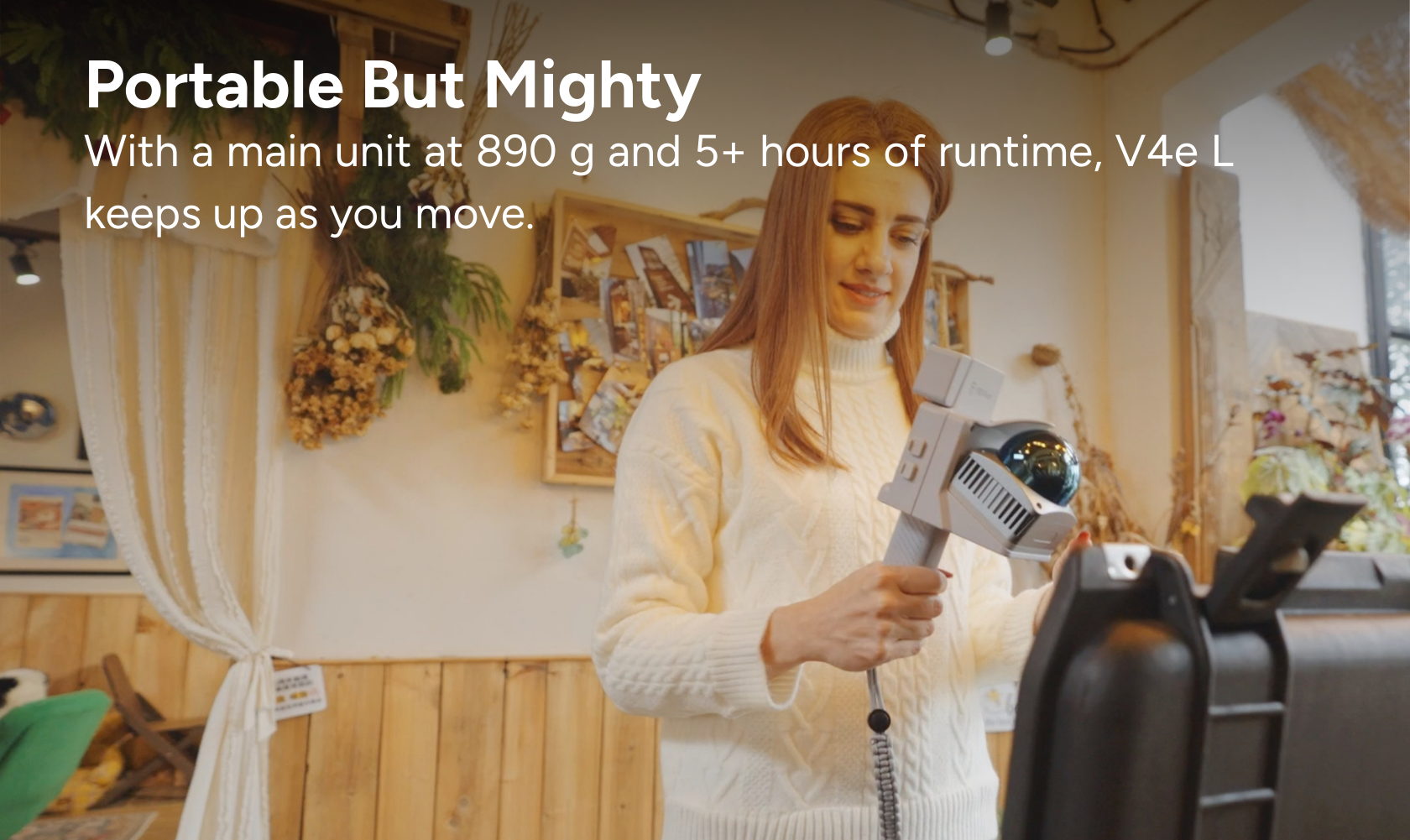
Traditional surveying and measurement methods can be accurate, but they often require more setup time, manual work, or repeated site visits. A portable LiDAR scanner makes 3D capture easier by allowing users to scan while moving through a space.
Compared with fixed-position equipment or manual measurement, a handheld LiDAR scanner can be more flexible for everyday fieldwork, especially in complex or changing environments.
Key Benefits of Portable 3D Scanning
- Faster site capture: Scan indoor and outdoor spaces more efficiently.
- More complete data: Capture walls, floors, ceilings, objects, openings, and site details as point cloud data.
- Flexible operation: Use handheld scanning in rooms, corridors, job sites, accident scenes, and outdoor areas.
- Digital documentation: Create measurable records for design, construction, inspection, or reporting.
- Better collaboration: Share point clouds, floor plans, 3D models, or CAD-ready data with project teams.
How 3D LiDAR Scanning Works
A 3D LiDAR scanner captures spatial data from the environment and turns it into a digital model or point cloud. In many mobile scanning workflows, the scanner uses SLAM technology, which stands for Simultaneous Localization and Mapping. This helps the scanner track its position while building a map of the surrounding space.
A typical scanning workflow includes:
- Capture: Walk through the area with a handheld or mobile LiDAR scanner.
- Process: Convert raw scan data into a point cloud or 3D dataset.
- Measure: Use the data to check dimensions, distances, areas, and site details.
- Export: Prepare outputs such as floor plans, CAD drawings, BIM references, or 3D models.
- Share: Use the digital data for team review, client communication, documentation, or project planning.
Common Applications of 3D Scanning Solutions
Different industries use 3D scanning in different ways. The value of LiDAR scanning comes from its ability to capture accurate, reusable site data that can support multiple workflows.
Interior Design and Renovation
For interior designers, architects, and renovation teams, LiDAR scanning helps capture existing room conditions quickly. The scan data can support floor plans, 3D models, as-built documentation, and design visualization.
This is especially helpful for older buildings, irregular layouts, apartments, commercial interiors, and renovation projects where existing drawings may be missing or outdated.
Construction and Engineering
Construction teams can use 3D scanning to document site conditions, track progress, compare existing conditions with design plans, and support as-built documentation. A handheld LiDAR scanner can help reduce manual measurement work and provide a digital reference for engineering teams.
For contractors and engineers, point cloud data can be useful for progress records, site verification, renovation planning, and coordination between teams.
Scan to CAD
Scan to CAD workflows help professionals convert real-world environments into CAD-ready drawings. After scanning, point cloud data can be used to create or support DWG/DXF drawings, floor plans, sections, and other design documentation.
This is valuable for renovation, architecture, construction, engineering, and facility documentation workflows where accurate existing conditions are important.
Scan to BIM
Scan to BIM helps teams capture existing buildings and use point cloud data as a reference for BIM modeling, renovation planning, and as-built documentation. Instead of starting from incomplete drawings, designers and engineers can work from a more accurate digital record of the real site.
For building projects, scan to BIM workflows can help reduce manual work, improve coordination, and support long-term building management.
Surveying and Mapping
Surveyors and mapping professionals use LiDAR scanning to collect spatial data for land, roads, infrastructure, terrain, and built environments. A portable 3D scanner can help capture complex areas efficiently and produce point clouds for analysis, measurement, and documentation.
Traffic Accident Investigation
For traffic accident investigation, LiDAR scanning can help document accident scenes quickly and accurately. Investigators can capture vehicle positions, road conditions, impact areas, and surrounding evidence as digital 3D data.
This helps reduce on-site time, preserve scene details, and support later analysis with measurable digital evidence.
Historical Architecture and Digital Twins
3D scanning is also useful for historical architecture, cultural heritage documentation, and digital twin creation. Portable LiDAR scanners can capture complex building details, facades, interiors, and structural features for preservation, modeling, or renovation planning.
3D Scanning Output: What Can You Create from a LiDAR Scan?
The value of a LiDAR scan depends on how the data is used. With the right workflow, scan data can support many types of deliverables.
| Output | How It Helps |
|---|---|
| Point Cloud | Provides a measurable 3D record of the scanned environment. |
| Floor Plans | Helps interior designers, architects, and renovation teams document existing layouts. |
| CAD Drawings | Supports scan to CAD workflows for DWG/DXF drawings and design documentation. |
| BIM References | Provides accurate existing-condition data for BIM modeling and renovation planning. |
| 3D Models | Helps teams visualize spaces, communicate ideas, and create digital project records. |
| Digital Documentation | Supports construction records, accident reports, facility management, and site analysis. |
How to Choose the Right LiDAR Scanner
The best LiDAR scanner depends on your project type, required accuracy, scanning environment, and output needs. Before choosing a scanner, consider how the data will be used after scanning.
- Portability: Choose a handheld or mobile scanner if you need fast scanning across rooms, job sites, or outdoor areas.
- Accuracy: Match the scanner accuracy to your workflow, whether for design, documentation, construction, or mapping.
- Indoor and outdoor performance: Consider whether you need to scan interiors, exterior sites, or both.
- Point cloud quality: Dense and clear point clouds can support better measurement, modeling, and documentation.
- Software workflow: Check whether the scanner supports measurement, floor plans, CAD exports, BIM references, or 3D models.
- Ease of use: A practical 3D scanning solution should be easy for field teams to learn and use.
How FJD Trion Supports Real-World 3D Scanning Workflows
FJD Trion provides portable LiDAR scanners and 3D scanning workflows for professionals who need fast, reliable reality capture. From indoor spaces to outdoor sites, FJD Trion LiDAR solutions help users capture real-world data and turn it into useful digital outputs.
Depending on your workflow, FJD Trion scanners can support:
- Interior design and renovation scanning
- Construction and engineering documentation
- Scan to CAD and scan to BIM workflows
- Surveying and mapping projects
- Traffic accident scene documentation
- Historical architecture and digital twin projects
If you need a portable LiDAR scanner for everyday fieldwork, the FJD Trion V4e LiDAR is designed for practical 3D capture across multiple professional workflows. For users who need advanced handheld mapping or larger project documentation, you can also explore FJD Trion P1 and FJD Trion P2.
Ready to capture real-world environments as accurate 3D data?
Explore FJD Trion portable LiDAR scanners and find the right 3D scanning solution for your workflow.
View FJD Trion V4e LiDAR | Explore Scan to CAD | View Interior Design Workflow
FAQ
What is a 3D scanning solution?
A 3D scanning solution is a combination of hardware and software used to capture real-world spaces or objects as digital 3D data. It can support point clouds, measurements, CAD drawings, BIM references, floor plans, and 3D models.
What is a LiDAR scanner used for?
A LiDAR scanner is used to capture accurate spatial data from real-world environments. It is commonly used for construction documentation, interior design, surveying, mapping, scan to CAD, scan to BIM, accident investigation, and digital twin creation.
What is a point cloud?
A point cloud is a collection of measurement points captured by a 3D scanner. It represents the shape and position of surfaces in a scanned environment and can be used for measurement, modeling, CAD, BIM, and documentation workflows.
Can LiDAR scans be used for CAD drawings?
Yes. LiDAR scan data can support scan to CAD workflows. Point clouds can be used as a reference to create CAD drawings, floor plans, sections, and other design documentation.
Can handheld LiDAR scanners be used indoors and outdoors?
Many handheld LiDAR scanners can be used for both indoor and outdoor scanning. The right choice depends on your required accuracy, project size, scanning environment, and output needs.
Conclusion: Choose a 3D Scanning Solution That Fits Your Workflow
3D scanning solutions help professionals capture the real world faster and turn site conditions into usable digital data. Whether your work involves interior design, renovation, construction, surveying, accident investigation, scan to CAD, scan to BIM, or digital twin creation, LiDAR scanning can make measurement and documentation more efficient.
By choosing a portable LiDAR scanner that fits your workflow, your team can capture accurate point clouds, create useful project outputs, and make better decisions based on real-world data.
Scan the Cheer, Launch the Year: 3DGS Magic with FJD V4e Combo
What Can You Do with a LiDAR Scanner?